AI for e-commerce · November 9, 2026 · 7 min read
How to fix zero-result searches on your e-commerce site


A shopper searches for “washable sofa covers” and gets nothing. You might have four sofas with removable machine-washable covers and no usable care data in search. Or you might not carry any. The blank page looks identical, but one case needs a catalog fix and the other needs an honest answer.
Start with the searches shoppers actually tried, then find out whether the right product exists under the same conditions. Don’t hide the problem by making every query return something.
To fix zero-result e-commerce searches, rank failed queries by volume and buying intent, then replay each with the shopper’s market and filters. Check whether the exact item is sellable. Fix indexing, vocabulary or product attributes when it is. When it isn’t, show honest alternatives and track recurring demand instead of forcing a match.
Find where the zero results are happening
Start with a recent window that reflects normal traffic, such as the last 30 days. Export or record the search phrase, number of attempts, surface, market, filters and result count where your tools provide them. Combine obvious spelling and capitalization variants for prioritization, but keep the original wording for replay. Remove personal data from notes or screenshots, including anything pasted into search by mistake.
Shopify’s Search & Discovery reports separate searches with no results from searches with results but no clicks. The reports described there cover the search results page, not predictive search. Test autocomplete separately if people drop off before submitting a search. Likewise, a chatbot conversation without product cards is a different signal: it can reveal longer requests and constraints the site search box never sees.
Start with five clusters that name an item, model, intended use or budget. Look at both frequency and consequence. A lower-volume query for an exact model number can merit attention before a popular but vague term like “nice gift.”
Match the fix to the reason, not the wording
Replay a failed query as a signed-out customer, using the same market and filters when you know them. Try the exact product name or SKU next. Then visit the direct product URL and confirm whether that variant is published and buyable in that market. These tests tell you whether to investigate visibility, retrieval or real assortment.
| What you find | Likely next step |
|---|---|
| The exact product is buyable but even its SKU returns nothing | Check the search index or catalog sync and the product’s visibility in the relevant channel and market. |
| The title works; the shopper’s equivalent term doesn’t | Add the shopper’s wording to product content or use a narrow synonym if your search supports it. Test both terms. |
| The item is indexed, but an important field is blank | Verify the missing attribute and add it to the product record at the right product or variant level. |
| The results disappear only after applying a filter | Check the filter data and its scope before removing the filter. The combination may genuinely be unavailable. |
| No product meets the requested constraints | Acknowledge the gap. If useful, ask which constraint is flexible and track the request for merchandising. |
A synonym should link words that refer to the same thing in your catalog. “Couch” and “sofa” might work. “Machine-washable” and “wipe-clean” do not: the distinction is precisely why the shopper asked. Shopify’s current search customization guide describes built-in semantic matching and product boosts. If your search tool doesn’t offer custom synonyms, try accurate shopper language in the product information. A targeted boost can help when you already know which product should rank for a particular term. For the underlying retrieval methods, see how semantic search works.
Worked example: “sofa with machine-washable covers”
Suppose the exact sofa model appears by name. The supplier’s care sheet says the seat and back covers can be machine-washed, but not the upholstered frame. The product page says only “removable covers,” and the store’s search index has no care field. Fix the product record and the search-visible attribute. Don’t make “removable” a synonym for “machine-washable,” and don’t attach the care claim to variants with different fabrics until verified.
Next, replay the original query and a similar negative control: a removable cover that is dry-clean only should not qualify. Open each returned product and check that the care guidance is visible to the customer. If several shoppers are also asking how to wash the covers, add a product Q&A grounded in the actual care instructions. That is a separate fix from making the right items discoverable.
Use unresolved chat questions as a second source
A typed query may say “oak table.” A conversation can add “under €800, seats six, real oak.” That detail lets you distinguish a genuine gap in the assortment from a searchable field that is missing or unreliable. Compare the evidence, but don’t combine site search events and chat conversations into one rate.
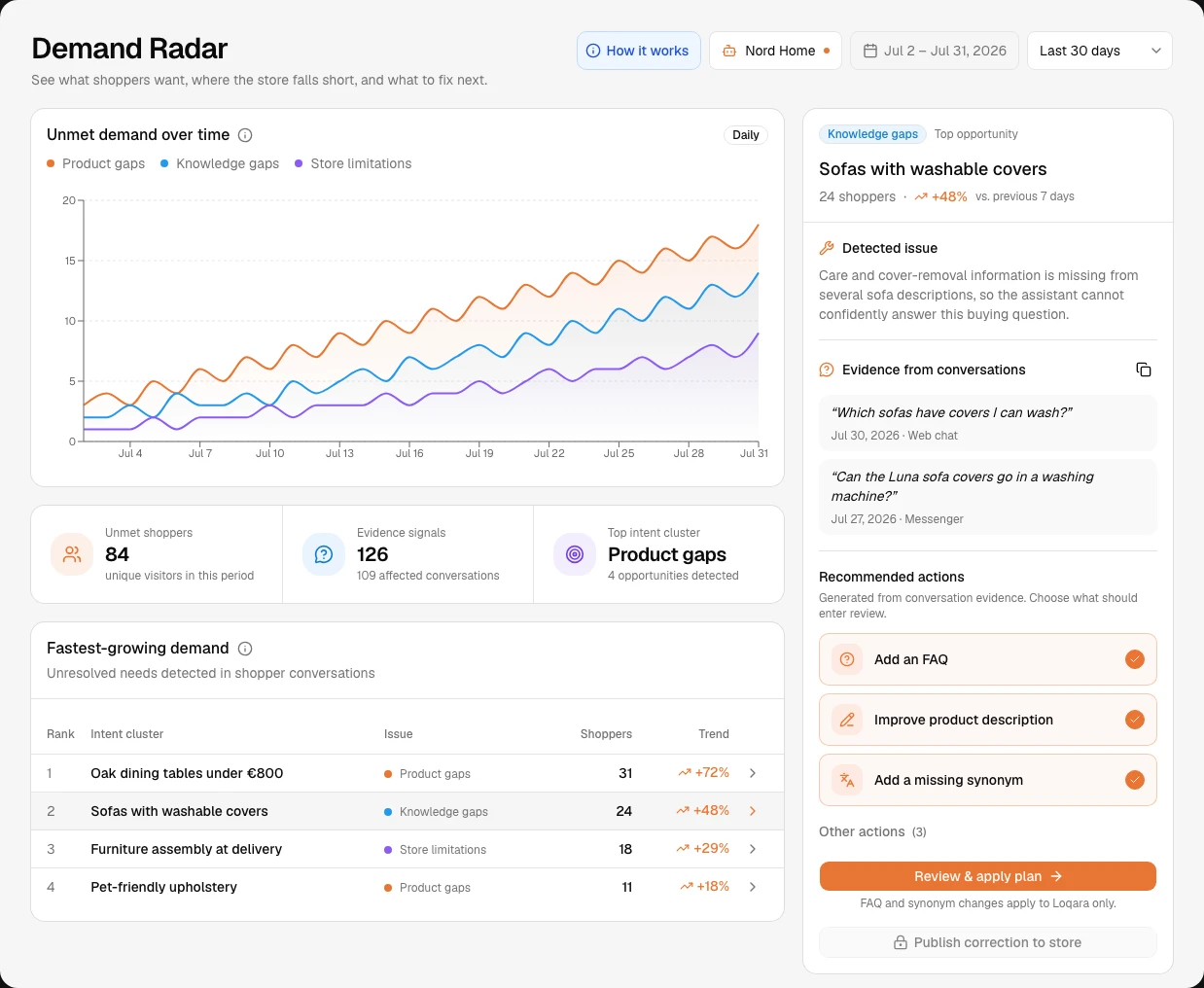
Loqara’s Demand Radar groups unresolved chat signals. It is not a report of all native storefront searches. Merchants can approve an FAQ for the bot or a synonym for Loqara’s product search. Catalog edits and new collections are review tasks, not automatic edits to the connected store. Use your store’s own search tools to change the native search behavior. A conversational product finder can complement that work by asking a shopper which constraint is negotiable before showing alternatives.
Keep the empty state useful without pretending it worked
Leave the original query visible and editable. If a filter made the list empty, show which filter can be relaxed. If you sell the item under another term, suggest that term explicitly. If you don’t have the requested size, material or model, say so and keep alternatives visually separate from exact matches.
Measure the improvement, not just the lower zero-result rate
For a given surface and period, divide searches returning zero products by submitted searches. Use the same counting rules and filters before and after. A lower rate is not a win if irrelevant products are filling the empty states. Track search-result clicks alongside it and recheck a short set of exact matches, legitimate misses and similar-but-wrong queries. Where you have enough data, check downstream actions such as add-to-cart, but don’t infer causation from a small before-and-after sample.
Keep one row per fix: original phrase, cause, changed field or rule, expected matches, one negative control, and a recheck date. If the same issue comes back next week, the row tells you where to investigate.
Frequently asked questions
Is every zero-result search a problem?
No. An honest zero is appropriate when nothing meets the constraints. Fix empty results for products you actually sell first. Use repeated unmet requests as evidence for merchandising, not as permission to broaden every search.
Will an AI chatbot fix my store’s native search results?
Not by itself. A chatbot can surface missing product facts and help shoppers refine a request. Its synonym rules generally apply to its own search unless it shares a configured search backend with the storefront. Test both surfaces and make catalog or native search changes where they belong.
When should I add a synonym instead of a product attribute?
Use a synonym for equivalent wording. Add an attribute when the phrase names a real constraint such as material, dimensions, finish or care. One changes how words match; the other changes what the store can prove about an item.