AI search visibility · August 5, 2026 · 12 min read
Product variants for AI shopping: structure sizes, colours, and SKUs


A shopper rarely asks for the abstract parent product.
They ask for the oak table at 180 cm, the black shoe in EU 42, the phone with 256 GB, or the fragrance-free version that is currently in stock.
If a catalogue represents those choices as one vague product record, an AI shopping system cannot reliably identify the item the customer can actually buy.
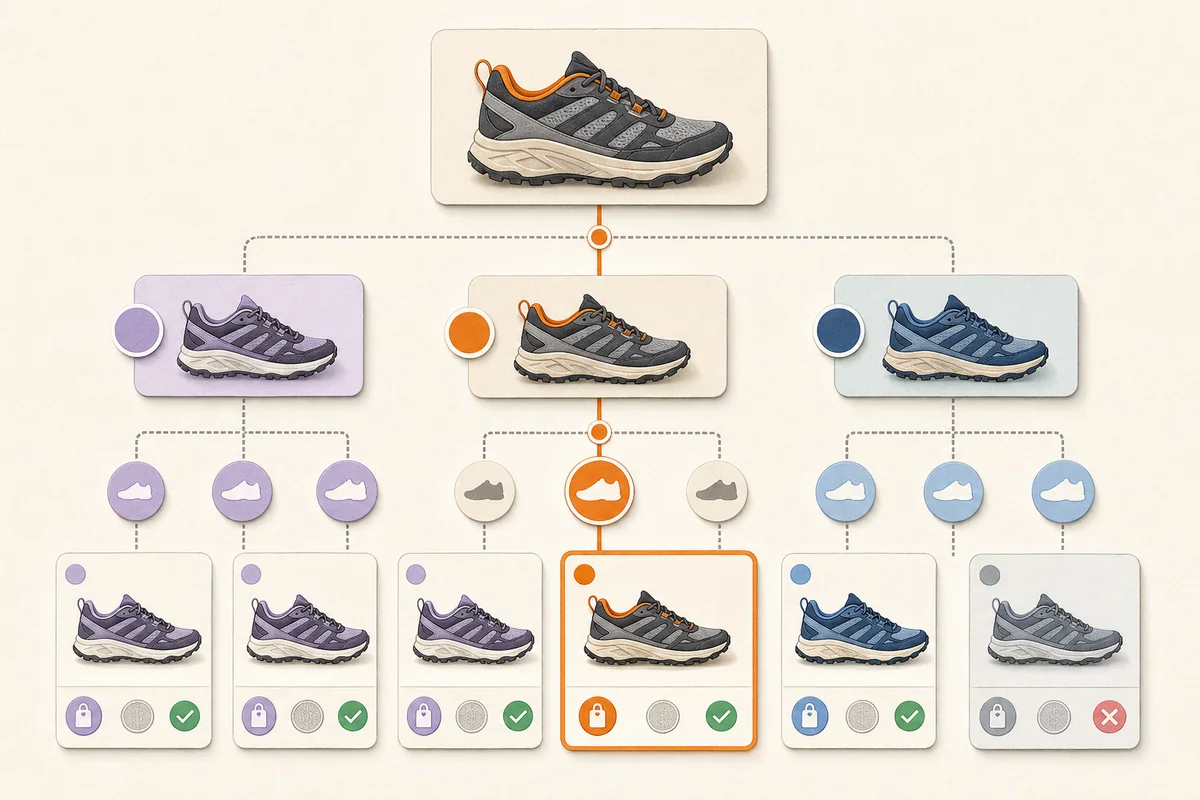
Product variants for AI shopping should be represented as distinct purchasable items with unique, stable IDs and exact attributes, prices, stock states, images, and directly selectable URLs. Related variants should share a stable group ID. Product pages, feeds, and structured data must agree so an AI system can distinguish the parent product from the chosen configuration.
Quick take
- The child SKU is the purchasable truth: stock and price often belong to the exact variant, not the parent.
- The group explains the family: connect variants without merging their differences.
- A variant needs a reachable state: its URL should preselect and visibly show the submitted option.
- Three layers must agree: storefront, structured data, and product feeds should describe the same item.
- Missing attributes require clarification: never guess a size, connector, material, shade, or configuration.
What counts as a product variant?
A variant is a purchasable version of a product that differs by one or more choice-defining properties while belonging to the same product family.
Common variant dimensions include:
- apparel size, colour, pattern, material, fit, or size system;
- footwear size, width, colour, or intended gender category;
- furniture dimensions, finish, upholstery, orientation, or leg option;
- electronics storage, memory, colour, region, processor, or connectivity;
- beauty shade, scent, volume, format, or formula version;
- spare-part model, connector, voltage, region, or compatible generation.
A bundle, accessory, replacement part, and merely similar product are not automatically variants. They may instead be a related product, required part, substitute, or independent listing.
Fashion stores also need to separate published size data from subjective fit. The fashion-store AI chatbot guide shows how a conversation can use exact garment and body measurements without pretending that one size label fits every shopper.
Google defines variants as similar products that differ by details such as colour and size, or electronics specifications such as memory and processor. Its current Merchant Center guidance says each variant should be submitted as a separate product with a unique ID, while all variants in the family share one item_group_id (Google Merchant Center, Item group ID).
Why do variants matter for AI recommendations?
Conversational shopping makes attribute errors more visible.
Consider the request:
“Show me the waterproof black version in EU 42 that is available now.”
The answer depends on five separate facts:
- the product family is relevant;
- waterproofing is documented for this item;
- black is an actual colour option;
- EU 42 is the intended size system and value;
- that exact combination is in stock.
A parent record saying “available in several colours and sizes” cannot support the answer. Returning a nearby variant and assuming the rest would create a confident but unpurchasable recommendation.
OpenAI's current product-feed specification says variant data supports better matching, cleaner grouping, and more precise recommendations. It recommends a stable group_id, a variations flag, and structured variant attributes for listings with variants (OpenAI, Products feed specification).
What is the difference between an item ID and a group ID?
Use this model:
| Identifier | Represents | Must be unique? | Example |
|---|---|---|---|
| Item ID / SKU | One exact purchasable variant | Yes | TRAIL-BLK-EU42 |
| Group ID / parent SKU | The shared product family | Unique to that family; repeated across its variants | TRAIL-SHOE-01 |
The item ID should remain stable for that variant over time. The group ID should remain stable for that family. Do not assign the same item ID to every size, and do not reuse one group ID for unrelated products.
Google explicitly warns against mixing up id and item_group_id, recycling group IDs, or submitting a non-purchasable parent SKU as if it were another product. OpenAI similarly documents item_id as unique per variant and group_id as the shared variant-group identifier.
What should a complete variant record contain?
At minimum, record the facts that distinguish, identify, display, price, and fulfill the variant.
| Field | Parent family | Exact variant |
|---|---|---|
| Shared name | Trail running shoe | Trail running shoe — black — EU 42 |
| Identifier | TRAIL-SHOE-01 |
TRAIL-BLK-EU42 |
| Varies by | Colour, size | Black, EU 42 |
| URL | Base product URL | URL that preselects black and EU 42 |
| Image | Representative family image | Exact black variant image |
| Price | Only if common and accurate | Current price for this item |
| Availability | Never infer from family | Current stock for black/EU 42 |
| GTIN or MPN | Shared only when genuinely shared | Exact identifier where assigned |
| Description | Common construction and purpose | Variant-specific differences and limitations |
Additional fields may include material, pattern, width, size system, region, voltage, orientation, dimensions, included parts, warning, sale period, and fulfillment information.
Do not encode every possible option into prose alone. “Available in black, blue, sizes 38–46, some widths unavailable” forces the receiving system to reconstruct combinations. Store the actual combinations explicitly.
How should variants appear in Product structured data?
Google recommends combining Product information with ProductGroup relationships. The current documentation uses:
ProductGroupfor the family;productGroupIDfor the parent identifier;variesByfor the dimensions that change;hasVariantorisVariantOfto connect products;ProductandOfferinformation for each exact item.
Google says each variant needs a unique identifier such as an SKU or GTIN, and each group needs its own group ID. Variant URLs should allow the exact option to be preselected and show the correct image, price, availability, and add-to-cart state (Google Search Central, Product variant structured data).
Two common storefront patterns are supported.
Single product page with selectable variants
The base page is usually canonical. Distinct URLs or query parameters preselect each variant, while the page visibly changes its image, price, stock, and selection.
The structured data can describe the group and nested variants. Put important product data in the initial HTML when possible; Google warns that dynamically generated Product markup can make shopping crawls less frequent or reliable for fast-changing price and availability.
Separate page for each variant
Each page needs complete, self-contained markup for the variant it represents and links that connect shoppers to the other options. Do not define the entire family only on one page and expect search systems to reconstruct off-page entities.
Canonicalization depends on whether the pages are genuinely distinct and useful. Do not canonicalize every materially different variant to a parent if that removes the only crawlable representation of the chosen item, and do not create thousands of empty parameter combinations merely to expose URLs.
How should variants appear in OpenAI product feeds?
In OpenAI's stable schema:
item_ididentifies the exact variant;group_idconnects related variants;listing_has_variationsindicates that variations exist;variant_dictrecords the option names and values;- fields such as
color,size, andsize_systemcarry standardized choices; item_group_titlecan supply the common family title.
For a confirmed Google-compatible feed, OpenAI maps item_group_id to its group model and maps supported variant attributes into normalized variant data. It treats one feed row as one product or variant (OpenAI, Google-compatible feed requirements).
The OpenAI product-feed checklist covers the rest of the merchant record, including URLs, images, price, stock, policies, and validation.
What does a good worked example look like?
Suppose one table lamp comes in two plug regions and two finishes. The combinations are separate purchasable items:
| Item ID | Group ID | Finish | Plug | URL state | Stock |
|---|---|---|---|---|---|
LAMP-OAK-EU |
LAMP-ARC-01 |
Oak | EU | Oak and EU selected | In stock |
LAMP-BLK-EU |
LAMP-ARC-01 |
Black | EU | Black and EU selected | Out of stock |
LAMP-OAK-UK |
LAMP-ARC-01 |
Oak | UK | Oak and UK selected | In stock |
LAMP-BLK-UK |
LAMP-ARC-01 |
Black | UK | Black and UK selected | In stock |
A request for a black EU lamp should not return the black UK item or the oak EU item as an exact match. A useful system can explain that the requested combination is unavailable and offer alternatives without relabeling them.
This is also where compatibility-heavy catalogues need extra care. A plug that physically resembles another standard, a case for the wrong model year, or a regional device variant is not a harmless substitution.
Which variant mistakes cause the most trouble?
All options live in one row
The system knows that colours and sizes exist but not which combinations, prices, or stock states are valid.
Every child has a different group
Related items look unrelated. Comparison and grouping become harder, and the shopper may see duplicate families.
Different products share one group
A bundle, accessory, refill, or next-generation model is presented as if it were merely another colour.
The URL opens the wrong state
The feed says black/EU 42, but the page opens the default blue/EU 40. The customer must reconstruct the recommendation and may encounter a different price or stock state.
One generic image represents every variant
This is especially misleading when colour, finish, included parts, orientation, or connector is the deciding feature.
Parent stock overwrites child stock
One available size makes the entire family appear available. Stock belongs to the purchasable item.
Variant names are not normalized
M, Medium, Med, and EU M may or may not mean the same thing. Preserve the value presented to the shopper, but maintain a governed mapping and size system rather than asking an AI model to guess.
How should a merchant test variant data?
Test the catalogue like a cautious shopper, not only like a feed validator.
Identity tests
- every variant ID is unique;
- the ID remains stable after exports;
- only genuine siblings share a group;
- the parent identifier is not submitted as an extra purchasable child.
Combination tests
- every submitted combination exists;
- impossible combinations are absent;
- no combination occurs twice in the group;
- custom dimensions such as orientation or plug type are preserved.
Page tests
- every variant URL returns 200;
- the correct option is selected;
- image, price, stock, and add-to-cart state match;
- the user can move to sibling variants;
- canonical and structured data are intentional.
Conversation tests
- exact match in stock;
- exact match out of stock;
- near match with one wrong constraint;
- ambiguous size system;
- missing variant attribute;
- incompatible region or model;
- request for a bundle or accessory that is not a variant.
“I could not verify that exact combination” is a successful result when the alternative would be an invented match.
What can Loqara do with product variants?
Loqara can search products from supported connected commerce platforms and present current product results inside an on-site conversation. The exact fields available depend on what the store and provider expose.
Loqara should not invent missing variant relationships, compatibility, stock, or attribute values. When an exact choice cannot be verified, the safe path is clarification, an explicitly labelled alternative, or human handoff.
The merchant remains responsible for the source catalogue, variant structure, page experience, destination feeds, and product claims. Better variant data improves both on-site assistance and external shopping discovery; it is not a guarantee of visibility in either system.
Frequently asked questions
Should every colour and size combination have a separate SKU?
Yes when each combination is a distinct purchasable inventory item. Give it a unique item ID or SKU and connect it to the family using the supported group identifier.
Can all variants use the same product URL?
They can share one base product page, but each submitted variant should have a URL state that directly preselects and visibly presents the intended option. Google explicitly recommends distinct paths or query parameters for preselection.
Should every variant have a separate canonical URL?
Not necessarily. A single-page selector commonly uses the base page as canonical, while genuinely separate variant pages may use self-canonicals. The correct model depends on the storefront architecture and whether each URL provides a stable, distinct page state.
What if only one variant is out of stock?
Mark that exact variant out of stock. Do not mark the whole group unavailable when siblings remain purchasable, and do not present the unavailable child as in stock because the parent has inventory.
Is a multipack a variant of the single product?
Usually it is a distinct offer or product relationship rather than a simple variant, especially when quantity, price, packaging, or identifiers differ. Follow the destination's supported bundle and multipack fields instead of forcing it into a size or colour group.
Does ProductGroup schema guarantee AI recommendations?
No. It helps Google understand product families and can make products eligible for variant information in merchant experiences. It does not guarantee indexing, rich presentation, AI citations, ranking, or sales.
Can an AI assistant choose a missing variant automatically?
It should not silently choose when the missing attribute changes fit, compatibility, price, availability, or safety. Ask a clarifying question or label an alternative with the unmet constraint.
The practical next step: choose one variant-heavy product family and trace every child from source catalogue to feed, structured data, URL state, image, price, and live stock.
Try Loqara free with real variant questions and verify that every recommended item is the exact purchasable option the shopper requested.